Warehouses and industrial facilities are the one scenario where power is rarely the problem — and that is exactly why the usual "no power, no network" pitch misses the point. A distribution centre has mains power at the wall and a router in the office. What it does not have is an affordable way to reach the loading dock, the yard, the rear gate and the far end of a twelve-thousand-square-metre storage floor with cable. This guide is about the four costs that actually decide how an industrial site gets covered: trenching and downtime, recorder maintenance, internal loss, and the evidence you need when a shipment is disputed.
1. The real cost of wiring a warehouse is not the cable
Compare two ways to add four camera positions to a facility that is already operating:
| Cost line | Wired / NVR installation | Self-powered wireless units |
|---|---|---|
| Cable, conduit and containment | Material plus labour on every run; long runs need repeaters or fibre | None — each unit carries its own power and its own network link |
| Ground works | Trenching for yard, dock and perimeter positions, then reinstatement of the surface | None — mounts on an existing pole, wall or column bracket |
| Operational downtime | Racking, forklift routes and dock schedules have to be worked around while cables are pulled | A drill, four bolts and a SIM card |
| Recorder room | NVR, hard drives, UPS, cabinet, cooling and physical protection for the box itself | Recording happens on a local TF card inside every unit; no cabinet, no drive replacement schedule |
| IT dependency | IP addresses, VLANs, port forwarding, NVR firmware, credentials for each viewer | App-based access with multi-user sharing; nothing to configure on the corporate network |
| Failure points | Every connector, and every lightning strike induced on a long copper run | A failure is one self-contained unit, not a channel on a shared recorder |
The pattern is consistent across the quotes we see: on an existing operating facility, the wiring and containment line is usually larger than the camera hardware line. Add the disruption of installing it during working hours and the gap widens further.
2. Match lens count to the layout, not to the budget
The core architectural difference between a multi-lens unit and a single-lens PTZ camera is simultaneity. Each lens on a multi-lens model has its own sensor, so three lenses watch three separate areas at the same moment — no motor swinging from one view to another, and no blind window while it turns. On a warehouse, those areas are almost always physically separated, which is precisely where a rotating camera keeps failing you.
| Area to cover | What matters there | Suggested configuration |
|---|---|---|
| Loading dock, yard and gate | All three at once — vehicles, drivers, doors, open trailers | 4-lens unit — MS42 class |
| Storage floor and aisle ends | Fixed views of racking rows and the pick faces that feed despatch | 3-lens unit aimed down aisles — MS31 / MS33 class |
| Rear gate and staff entrance | Individual identification at the pedestrian route | 2-lens unit — MS22 class |
| Perimeter fence and rear yard | Perimeter line and approach road, plus illumination | Street-light camera — MSL31, or see our perimeter security guide |
The mistake we see most often is covering the whole storage floor with fixed cameras when the theft risk sits at four points: the dock, the bin, the gate and the staff exit. Coverage should follow the movement of goods, not the area of the building.
3. Internal loss is the quiet one
External break-ins make the news, but across distribution operations the larger recurring loss is smaller and internal: cartons that leave in a car boot, damaged stock written off without a cause, pallets that shrink between two bays. This is a visibility problem rather than a security-technology problem, and it needs three specific views:
- The despatch face. Camera on the dock doors and the staging lane, so the pallet that was loaded can be matched to the order that was picked.
- The staff circulation route. The pedestrian exit and the locker area, which is where small goods leave. This is a dignity-neutral point in practice: a visible camera protects the honest majority as much as it deters anyone else.
- Waste and returns handling. The compactor and the returns bench, where both genuine disposal and concealment happen.
4. Shipping evidence: the operational benefit nobody quotes for
For exporters and 3PL operators, the strongest day-to-day argument for dock cameras is not crime at all — it is dispute resolution. When a buyer claims short delivery, or a forwarder reports damage on handover, the question is always the same: what was the condition and the count when the goods left your premises?
- Carton count and pallet condition at load. Timestamped colour footage of the loaded pallet ends the argument before it starts a claim.
- Vehicle and container identity. Recording the container number and the collecting vehicle at the moment of loading closes the chain of custody.
- Loading time and sequence. A timeline of when each vehicle arrived, loaded and departed is also the raw data for dock productivity — the same footage answers a security question and an operations question.
- Damage claims against carriers. Footage of goods in sound condition at the moment of handover shifts the liability question to where it belongs.
This is the case where a camera system in a warehouse pays for itself without a single intrusion ever being recorded.
5. Night, weather and the industrial environment
- Full-colour night vision matters more on a yard than in a corridor. Colour is what distinguishes vehicle livery, hi-vis clothing and load condition; monochrome infrared gives you silhouettes.
- Dust, rain and wash-down. The same IP66 protection that suits agriculture suits a yard and a wash-bay area. Units that are only "weather resistant" fail at the connector, not the housing.
- Vibration and impact. On racking columns and dock frames, mountings must tolerate flex. A camera that drifts 5 degrees after a forklift nudge is aimed at the wrong place a week later.
- Signal in a steel building. Metal racking and cladding attenuate cellular and WiFi signal. Take dBm readings at the actual mounting position, and where the site is a steel-framed box inside, favour models with external antennas such as the MS45.
- Lighting glare. Never aim a camera directly into a dock floodlight or a low sun. Ten to fifteen degrees of downward tilt removes most of the problem and doubles usable detection range at night.
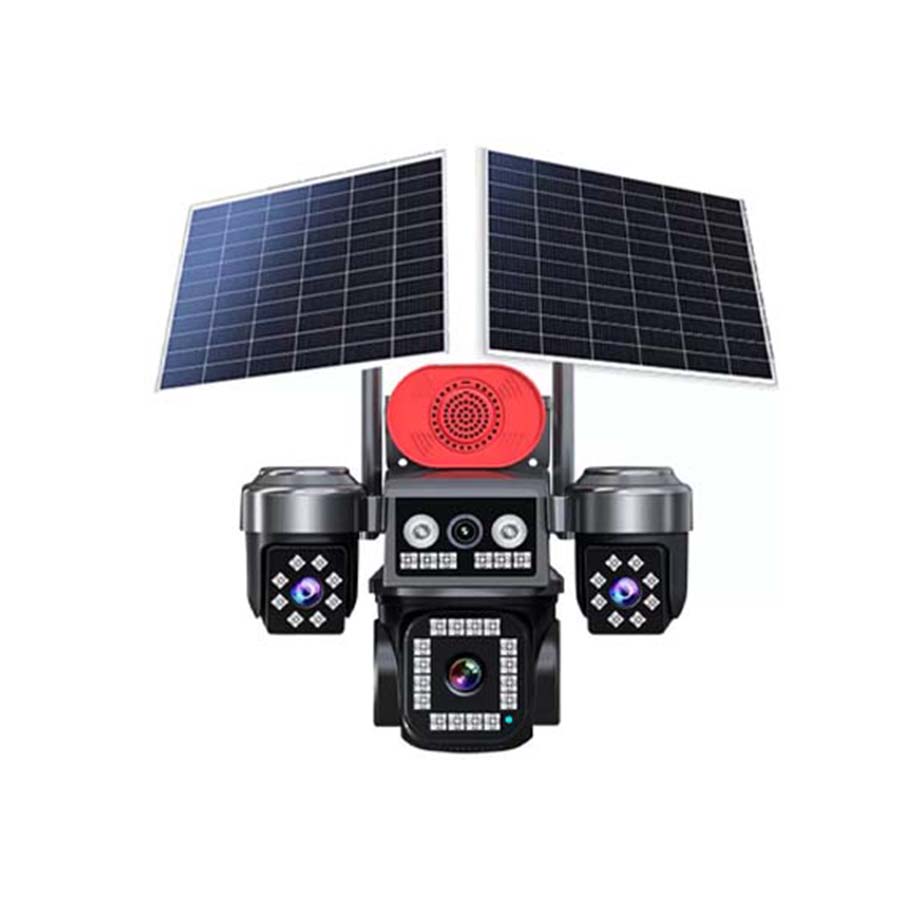
Dock and yard standard: MS42 4-Lens Camera, Three Screens
Four simultaneous views for the dock, the yard, the gate and the loading lane — with the multi-screen interface that lets a shift supervisor watch the operation rather than cycle through channels.
View MS42 Specs Request a site survey →6. Recording, playback and access without an IT project
A warehouse system fails in practice not because the cameras stop working but because the recording is unusable when someone needs it. Three requirements to settle before you buy:
- Recording that survives a network outage. Local TF card recording in each unit means footage is written regardless of what the cellular link is doing. No cloud dependency, no recorder to lose power.
- Playback that a shift manager can operate. Timeline playback by date and time, without a training course on NVR software. If the person who needs the footage cannot retrieve it themselves, the system is not being used.
- Access for the right people only. Multi-user sharing lets the site manager, the security supervisor and an off-site operations director each hold their own access, without sharing a single set of credentials.
For a multi-site operation, the same app covers every location and every model in the fleet — one place to check, one alert stream, one place to add a user. That consistency is worth more than any individual specification once you are managing more than two facilities.
The bottom line
An industrial site does not need surveillance theatre. It needs four or five self-contained units at the four points where goods actually move — the dock, the gate, the staff exit and the yard — each of which can be installed without a contractor, powered without a new cable, and consulted by a shift manager without calling IT. Buying coverage by floor area is how warehouses end up with twenty cameras and no usable footage of a missing pallet.
Frequently asked questions
Do warehouse cameras need to be hardwired to the mains?
No. The units we supply are self-powered: each carries its own solar panel and battery, so installation requires no mains connection, no containment, no trenching across a yard and no downtime on the racking or dock schedule. On an existing facility this is usually the difference between a two-day contractor visit and an afternoon with a drill.
Can a wireless camera record instead of an NVR?
Yes. Each camera records to a local TF card inside the unit while simultaneously streaming live to the phone or desktop app. There is no recorder cabinet, no hard-drive replacement schedule, no UPS to maintain and no separate box on site worth stealing — which removes both a cost line and a physical risk.
How many cameras does a warehouse need?
Coverage should follow the movement of goods rather than floor area. Most facilities settle on four to eight positions: the loading dock, the yard and gate, the despatch staging face, the staff entrance, and the returns or waste handling point. Adding cameras down every aisle rarely changes the loss figure.
Can the footage be used to settle a shipping dispute?
It is one of the most useful applications of a dock camera. Timestamped colour footage of the loaded pallet, the carton count, the container number and the collecting vehicle establishes the condition and quantity of goods at the moment they left your premises — which is precisely the evidence a buyer, forwarder or insurer asks for.
Will a solar camera work inside a steel-framed building?
Cellular and WiFi signal are both attenuated by metal cladding and dense racking, so measure the signal at the exact mounting position rather than assuming. Where reception is weak — common for cameras deep inside a steel building — choose a model with external antennas, such as the MS45 class, rather than relying on an internal one.